Steward

The Business Automation Factory

An AI agent that builds automations for your business, runs them on a schedule, and repairs them when they break — on a server you own.

Start here

curl -fsSL https://raw.githubusercontent.com/FrontAnalyticsInc/steward/main/install.sh | bash

Pre-release. Today this prints what you'll need and installs nothing. The figures below are what it is being built to.

  • 10 min to install
  • Your hardware
  • No account with us

Your mail and your keys never leave your machine.

  • There is no service to breach

    No account, no upload, no copy of anything held by anyone else.

  • Nothing faces the internet

    Reachable only on a private network you control.

  • Approvals, not autopilot

    Outgoing work waits for you. Leave it that way.

  • It runs as root on its box

    Give it a server of its own, not your laptop.

  • It reads what strangers wrote

    Mail and pages can carry instructions meant for the agent.

  • A stuck job spends money

    Set a hard cap at your provider on day one.

Install

One command. It asks where.

There is nothing to configure before you start. The first thing the script does is ask where Steward should live, and it takes care of the rest from your answer.

Where should Steward run?

  1  Amazon Web Services
  2  Google Cloud
  3  A box I already have

? _
01

AWS

Creates a t3.medium in your own AWS account and installs onto it. Billed by Amazon, never by us, and removable in one command.

02

Google Cloud

Creates an e2-medium in your own GCP project. Same deal — your account, your bill, gone in one command when you say so.

03

I have a box

A VPS, a homelab, anything running Ubuntu that stays awake. Just not on a laptop — Steward runs on a schedule, and a sleeping machine misses it.

What it does

Just a few examples.

Standing jobs that run on their own and leave finished work waiting for you. These are a handful — you'll end up with your own.

Every one hands you a draft to approve. Nothing goes out as you unless you turn that on — and you shouldn't, in week one. It does the personal end too, once the business runs itself: your field, your reading, the people worth reconnecting with.

The factory

Nothing about it stays generic.

Those five examples are only where it starts. Every part of Steward bends to your business — what it watches, how it writes, what it builds next. Month three looks nothing like day one, and nothing like anyone else's.
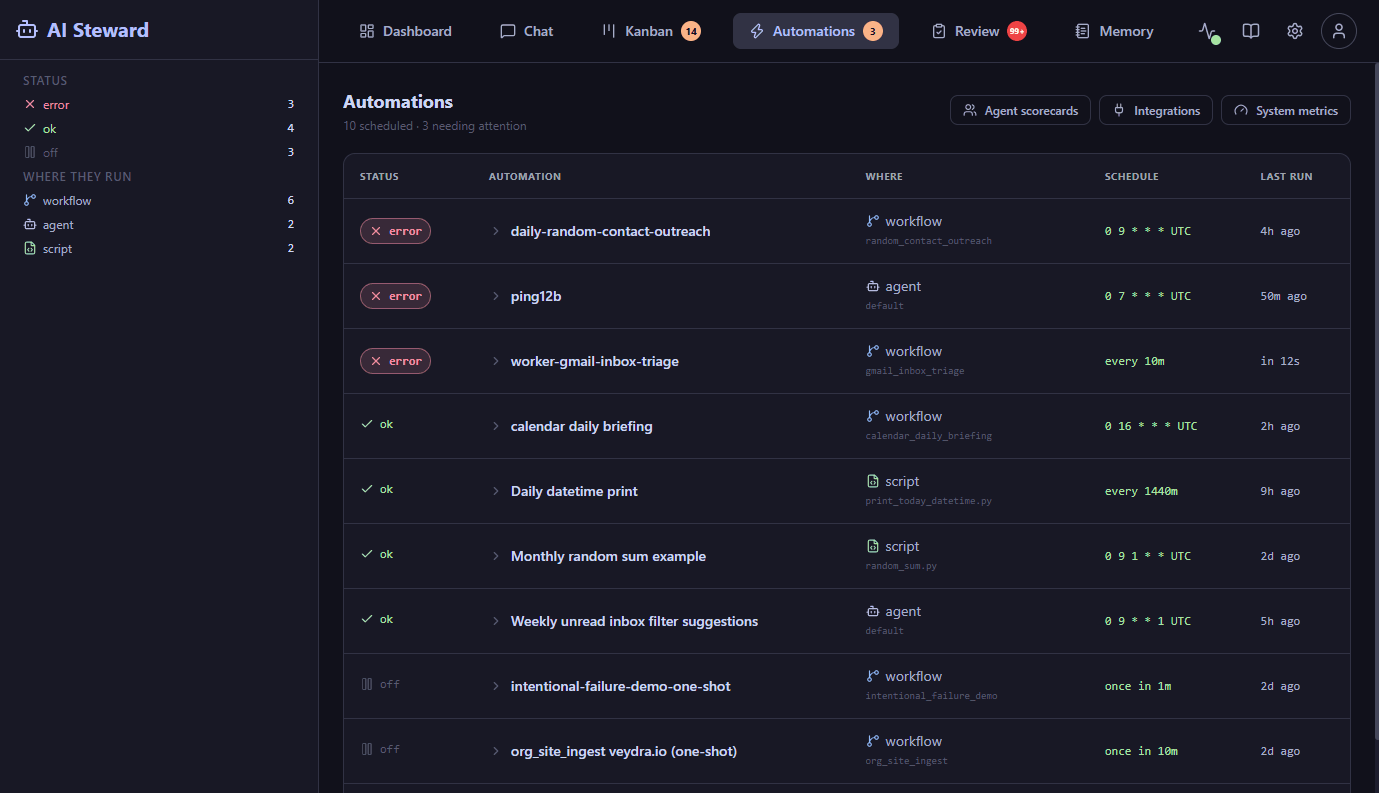
Steward's automations screen: ten scheduled jobs listed with their status, where each one runs, its schedule and when it last ran.
Learns

It tunes itself to your judgement

Every draft you rewrite before approving is a correction it keeps — your voice, your standards, what you'd never send. Week four sounds like you.

Builds

It makes whatever you describe

Say what you want in a sentence and it builds the automation, schedules it, adds it to the line. No canvas, no integrations to wire, no waiting on us.

Repairs

It keeps itself running

Sites change, credentials lapse, jobs break. It notices, retries, fixes what it can — and tells you plainly what it can't, so nothing rots quietly.

Maintenance

Your automations don't rot.

Every tool on the market helps you build an automation. Almost none of them keep it alive. Pages get redesigned, credentials lapse, a model changes its mind about the format — and the thing you built six months ago has been quietly failing for five of them.

  1. Describe
  2. Build
  3. Schedule
  4. Run
  5. Monitor
  6. Repair
  7. Improve

↵ and back to Build, without you asking.

So they accumulate. Every automation it builds is another worker that never forgets how to do its job, and every week your business runs a little more of itself than it did the week before.

Ten minutes from now, it's running.

Option one

Do it yourself

Free — open source, MIT licensed

The script asks where to put it, installs everything, and prints a link. The setup page walks you through the rest. No sales call, no trial, no account.

curl -fsSL https://raw.githubusercontent.com/FrontAnalyticsInc/steward/main/install.sh | bash

Pre-release. The command runs, and tells you it installed nothing. Take option two until it does.

You pay your own cloud and model bills. Nothing comes to us.

Option two

We do it with you

Talk to us about scope

A screen-share from empty server to working automations, the fiddly Google and mail configuration done properly, and jobs built around how your business actually runs. Then someone to call.

Minimum you need for it to work

  • An Anthropic or OpenAI key — Steward does nothing until you give it one, and it never leaves your machine.
  • Around $35 a month — for the server, if the script makes you one. Nothing if you already have a machine. Model usage sits on top of that, capped wherever you set it.
  • A machine that stays awake — Steward runs on a schedule, so a laptop that sleeps will miss it.
  • No terminal after this — the script prints a link, and everything from there is a page in your browser.

Where it sits

You

A browser tab on your own network

Steward, on your server

Your keys and your mail live here, and nowhere else.

  • Email
  • Calendar
  • CRM
  • Files
  • GitHub
  • The web
  • Your cloud
  • Model API

It reaches these with your credentials. Nothing routes through a third party unless you tell it to — including us.